Showing posts with label Misc. Show all posts

Saturday, February 25, 2012

Review: Beeyoutiful's B.A.L.M. and Ow! Ease

Photobucket

When my children were younger, I didn't know much about natural remedies.  Whenever they started to show signs of sickness, my best tools were fluids and sleep with some prayers that it wouldn't get worse enough to require a doctor's visit.  I wish I had known some of the natural remedies that help boost the immune system and body to repair itself.  If I had, I think I would have saved us a few trips to visit the pediatrician.

Beeyoutiful is a supplier of natural products for healthy living with a desire to help others obtain and maintain good health.  A couple of years ago, I reviewed Beeyoutiful's Berry Well, an immune system booster. This second time around I was able to sample the B.A.L.M. lip moisturizer and Ow!-Ease .

PhotobucketI received the peppermint B.A.L.M.  I usually don't like peppermint balm, but this one has a lighter scent with a smooth application. It is made of organic grapeseed oil, organic shea butter, beeswax, and peppermint essential oil.  It made for a great all-around, every day lip moisturizer.

PhotobucketThe Ow!-Ease is an arnica-based trauma salve.  I had actually never heard of arnica before, but discovered it is a flower that has been used medicinally for centuries, often for sprains and bruises.  Other ingredients include olive oil, calendula, St. Johns Wort, cayenne, coconut oil, beeswax, and lavender and rosemary essential oils.

Ow!-Ease has a light natural scent with an easy application in a twist-up tube. The blend has a slight greasy feel, but goes on smoothly and is absorbed by the skin in a short time. I did not have the opportunity to personally use Ow!-Ease, but both my husband and son used it for sore back muscles and said it was helpful. When my son was younger, I used to put regular lotion on his bumps and bruises to satisfy his need for me to "fix it".  With Ow!-Ease, the application would have had more than an emotionally soothing effect and actually helped the injury heal faster. It would have definitely been great to have around when my kids were little to put on bumps and bruises.

B.A.L.M. lip moisturizer, which is available in both peppermint and orange, retails for $3.00.  The Ow!-Ease retails for $15.00, with quantity discounts available.  Both can be purchased, along with other products to benefit your health, at the Beeyoutiful website.

Disclaimer: This review was provided as a result of my participation in The Old Schoolhouse Magazine Crew. I was provided the product free of charge in exchange for my honest review. I have received no other compensation. I strive to give a balanced overview of each product, detailing my opinion of both pros and cons and how the product worked for my family. What works for one family may not work for another. I encourage you to read reviews of other Crew members and research sufficiently to determine if any product will be a benefit to your homeschool. You may read more reviews on this product by visiting here.

Thursday, January 5, 2012

Review: Z-Guide to the Movies (Zeezok)


Do you ever have those days where you just want to ditch the textbooks and watch a good movie snuggled up on the couch with the kids instead. Who doesn't? And with this cold, wintery weather upon us, add some tasty hot chocolate and a warm blanket along with the buttery popcorn.

While watching movies for school sounds a bit guilt-producing, it doesn't have to be.  Many movies have great educational value in addition to being entertaining.  Better yet, Zeezok Publishing has made tapping into all that education-waiting-to-happen easy-peasy with their Z-Guide to the Movies series.

With dozens of guides from which to choose, my high school daughter selected the Driving Miss Daisy Z-Guide.  This review was actually perfect timing for her upcoming film review assignment for her AP U.S. History class. 

Each Z-Guide is available as a PDF file, purchased as a download or on CD.  Most of the
films are available on Netflix or the library. We found Driving Miss Daisy and many others on the Z-Guide list available at our small town library.

Ten educational activities related to a specific film are included in each guide.  The student is first given a topic overview and a synopsis of the film to review before watching.  Then, as they watch the movie, they are provided a series of review questions that are intended to keep them engaged and paying attention while viewing.  The ones in our guide ranged from simple fact questions to those that hinted at the larger themes in the movie.

Following the questions, our guide had four activities that involved some extra study and reflection, such as further study of Martin Luther King or writing an essay on whether Miss Daisy was prejudice. Hands-on activities, an art project, a discussion of the movie's worldview, and exploration of the art of filmmaking (foreshadowing, for example) round out the activities. There is a 37-page sampler that includes activities from a variety of Z-Guides for your viewing.

The recommendation for the guide is to do two activities a day, with completion in about a week, making it an ideal supplement to other materials exploring the same time period. There are individual guides for movies covering Ancient Civilizations all the way through post-World War II. 

Overall, I really liked the Z-Guide we reviewed.  We didn't do all the activities, but the ones we did were a great starting point for discussing the depth of the movie and underlying messages that may have been overlooked otherwise.

Add a little edutainment to the day, and browse through the Z-Guide selections, which are available through Zeezok Publishing for $12.99. Then, break out the popcorn and hot chocolate and declare an official Movie Day in your homeschool.

Disclaimer: This review was provided as a result of my participation in The Old Schoolhouse Magazine Crew. I was provided the product free of charge in exchange for my honest review. I have received no other compensation. I strive to give a balanced overview of each product, detailing my opinion of both pros and cons and how the product worked for my family. What works for one family may not work for another. I encourage you to read reviews of other Crew members and research sufficiently to determine if any product will be a benefit to your homeschool. You may read more reviews on this product by visiting here.

Saturday, December 3, 2011

Review: Medieval Machines Pack (Pitsco)


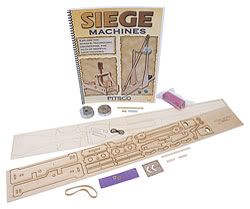
Two of my son’s favorite words are “build” and “projectile”. As you can imagine, he was super excited when the Medieval Machines Pack from Pitsco arrived for review.

Our pack included:

  • Trebuchet Kit
  • Catapult Kit
  • Mass Plates
  • Siege Machines Book

In addition to the above Medieval Machines Pack, we also received:
The first machine we built, by the request of my son, was the trebuchet.  Punching out the pre-laser cut pieces from the wood was no problem; in fact, some of the pieces had already come loose during shipping. 
1
I was a little concerned that the wood pieces would not be very sturdy, but this was an unfounded worry.  While lightweight, the wood strength was up to the task at hand.

The instructions were very clear and my son was able to put the trebuchet together almost completely on his own.  The requirements to 2read and follow directions during the building process, measure (twice) and cut (once), and be precise were great learning exercises.  The most difficult part of putting the trebuchet was the sling portion, which involved a piece of nylon and thread that needed to be attached both to the nylon and the machine, with the end result of thread of equal lengths on either side of the sling.  A bit tricky, but not difficult with some patience.  Patience, however, is not something that comes easily to my son, which is also the reason we opted to use Super Glue to construct our machine rather than wood or Tacky glue that might take a bit longer to dry.

5
We built the kits on two different days, but doing both in the same day is completely feasible. While the trebuchet took us a bit longer, construction of the catapult was less than an hour. My husband joined in on the catapult construction. (As a side note, these kits are great for getting Dad involved with homeschooling!)  Again, the construction for the catapult was simple, aside from a very tight-fitting dowel.  Wood glue was used for the construction this time, and I found that to work better.  On the trebuchet, I ended up regluing a couple of pieces together.

Both kits have survived a fair amount of play battles.   My son set up a battle field of pewter figurines, and needed to adjust either the size of his projectile, the distance of the machine from the target, or the load used in order to hit his target. While the included Siege Machines book has experiments and activities to do with the kits, free play alone has provided a natural learning experience.
4The Siege Machines book includes a history section among its 32 pages, in addition to the science behind them, hands-on experiments, and math integration. The last few pages are devoted to the standards addressed from three national education organizations, such as NSTA, ITEA, and NCTM. As a testament to the focus of learning through play of this product, we discovered this same kit is also distributed in the Lego Education catalog. As a Lego fan, that made my son love the kit even more!

Overall, I found this kit to be an exceptional value of building, learning, and playing and a wonderful blend of educational and just pure fun.

The Medieval Machines Pack can be purchased from Pitsco for $21.95. Be sure to check out the many other STEM (Science, Technology, Engineering, and Math) related items available or request a catalog.

 See what others have to say about this product by visiting the official TOS Crew blog!

 Disclaimer: This review was provided as a result of my participation in The Old Schoolhouse Magazine Crew. I was provided the product free of charge in exchange for my honest review. I have received no other compensation. I strive to give a balanced overview of each product, detailing my opinion of both pros and cons and how the product worked for my family. What works for one family may not work for another. I encourage you to read reviews of other Crew members and research sufficiently to determine if any product will be a benefit to your homeschool.

Wednesday, October 19, 2011

Review: E-Mealz

Photobucket
Each time I sit down to meal plan, I print off a blank calendar for the month, and write in some standard meals, e.g. tacos, hamburgers, and spaghetti. Then I pull out my recipe books, review clipped favorites or recipes I’ve been wanting to try, and even surf recipe websites in an attempt to come up with enough interesting meals to fill in the rest of the days.  It is quite the process that I often drag out over days, and I hate it.  Absolutely hate it.

I’ve thought about planning weekly, but feel it is almost better to take my suffering all at one time rather than endure it four times a month. So, I continue to go on as normal and fantasize about having a personal chef to both plan and cook for me.

E-Mealz, which is recommended by financial guru Dave Ramsey, is a subscription service that provides a weekly meal plan and shopping list. The idea is that the service will save money in the long run by avoiding costly dinners out and planning meals around store sales. There are twenty-eight different meal plans are available. A list of meal plan options and samples are available here. The weekly plan includes ingredients and instructions for one meal a day, with suggested side dishes.

How it works is fairly simply.  Subscribers select a meal plan that suits their family.  Once a week, a new plan is available on the website for download and/or printing.  The entire plan is two pages, with the recipes on one page, and the shopping list on the other.

E-Mealz isn’t a perfect system.  A perfect system would be that personal chef that works for free.  However, unlike my other options, E-Mealz is fairly practical.

What I liked:
  • Easy recipes – There are no overly complicated recipes.  Older kids could easily take over some of the cooking!
  • Catagorized shopping list – Grocery items are listed in five categories: Deli/Produce, Meats, Dairy/Refrigerated, Frozen, and Canned/Bottled/Packaged.
  • Meals specified on grocery list – Next to each item is a number that signifies the recipe that requires that ingredient. This makes tweaking recipes or accounting for items on-hand very easy.
  • List of staples – At the bottom of the list are all the staples needed for each recipe.  I often forget to check my supply on staples and get in a bind come preparation time.
  • Variety – New meals are provided each week.  Some recipes are cycled again, but only about every 5-6 months.
  • Ease of use – Nothing complicated here.  Simply print and go.
DSC_0007b
This Poppy Seed Chicken dinner from the Any-Store meal plan was a hit with my daughter.
What I disliked:
  • Easy recipes – Yes, this was also in the “like” list.  However, sometimes the recipes were too easy.  One “recipe” was simply a purchase of precooked ribs from the deli with a can of beans and frozen french fries.
  • Finding a plan – It was hard to tell if you’d like a plan from the sample menus. I was not happy with my first plan and switched after several weeks. Subscribers are allowed to change plans one time during a 3-month subscription.
  • Needing to substitute – My family can be picky, and I definitely had to substitute some meals every week.
  • I didn’t save on grocery expenses – I didn’t find a great cost savings. Many of the items were convenience or packaged items.  Also, when I shop sales, I purchase sale items in mass quantity and stock up my pantry for maximum savings.  This program isn’t designed to save that way.
  • I would have preferred that my meal plan arrived via email rather than needing to go to the site to retrieve it.
Despite some of the cons, I liked E-Mealz quite a bit. Yes, I had to substitute or tweak some meals, but it was easy enough to replace with an old stand by or leave out ingredients. With the grocery list items labeled with the corresponding recipe, it was quick to cross off items no longer needed when substitutions were made.  And the time and fussing it saved…oh, my.  One week was particularly busy and I desperately needed to get groceries, but with no real time plan.  I grabbed the E-Mealz plan, quickly did a few tweaks, and headed to the grocery store while my son was at a sports practice. I had about an hour in the store to accomplish my shopping and did so easily. While E-Mealz didn’t save me a lot on actual grocery cost, it did save me time and sanity, both valuable things!

DSC_0112b
Simple Chicken Kabobs
I’m not sure that I would use a subscription service like E-Mealz indefinitely or exclusively, but I can definitely see using it to avoid cooking ruts, to help during very busy seasons, or to act as a starting plan to tweak.  Sometimes I just need reminders of other simple recipes to use, rather than get stuck in the taco/hamburgers/spaghetti rut. At $5/month (purchased as a 3-month subscription at $15), even if I only put part of the plan to use, it is worth it to me. Plus, if I opt to not use the plan for that week, I can always download the plan and save it for another week and/or use the recipes that look promising from the unused week as substitutions for another. I plan to put E-Mealz on my Christmas list to extend my review subscription. There isn’t much I need as far as things, but I certainly could use some more time!

To learn more or to purchase a subscription, visit the E-Mealz website.

See what others have to say about this product by visiting the official TOS Crew blog!

Disclaimer: This review was provided as a result of my participation in The Old Schoolhouse Magazine Crew. I was provided the product free of charge in exchange for my honest review. I have received no other compensation. I strive to give a balanced overview of each product, detailing my opinion of both pros and cons and how the product worked for my family. What works for one family may not work for another. I encourage you to read reviews of other Crew members and research sufficiently to determine if any product will be a benefit to your homeschool.

Wednesday, October 12, 2011

Review: Principles of Marketing (Professor in a Box)

Professor in a Box - Logo

Does your student desire to have a career in business, or aspire to own a business one day? If so, basic marketing knowledge will be valuable in working toward his or her goals. Professor in a Box has recently released Principles in Marketing, a college-level marketing course for high school students with an interest in business. Students completing this course will also be prepared for the CLEP Principles of Marketing Exam.

Professor in a Box - Marketing ProductSuitable for any high school level student with basic reading and math skills, there are no prerequisites for this course. In Principles in Marketing, Dr. Julie Pirsch, Ph.D. covers 19 chapters of typical introductory marketing material in 28 lessons.  The course can be completed in a semester with 2 lessons a week, a standard college pace, or in 28 weeks at 1 lesson a week.  The lectures are presented as flash lectures, in 1-2 parts, with 10-20 slides each.  The students are presented with audio of the professor that correlates with the self-advancing slides. Each lecture is approximately 30 minutes long. You are able to sample Chapter 1 in its entirely to get a feel for the style of the instructor and presentation.

I felt the content and delivery of instructor was fairly typical of a first year college-level marketing course (and I’ve had a handful of marketing courses in my day for good comparison). The instructor was easy to listen to and follow. While I would caution that if your student isn’t ready for a lecture style presentation, you might want to wait a bit for the course, it is also a great exposure to a formal lecture style course that students might see the first year of college.

This is a completely independent course and extremely easy to use.  There is no textbook to read and students simply watch the lecture, spend some time reviewing the lesson’s concepts, investigate online resources by chapter, and take the quiz.  Each lesson has a multiple-choice quiz, which takes about 15 minutes to complete; there are also 3 exams for the course.

I can’t say my daughter loved the course, but she felt the presentation and method were fine and it would certainly be manageable to carry through to the end of the course.  Given that it is an introductory course on a topic that is much more exciting when studied at higher levels, I wasn’t exactly surprised she didn’t die of excitement over the course. One of the very reasons to take such a course that prepares for the CLEP is so that you can test out of it for college and move on to the more exciting material!

She mentioned that she liked that you could watch lectures whenever you wanted, unlike the numerous live online classes she’s taken.  From this I gathered that she felt the course lectures had a class feel, rather than learning from a book, or watching a course on DVD.

It would have been nice if the quizzes and exams had some sort of record keeping ability.  The student is told whether an answer is correct or incorrect when each individual answer when submitted, then given a overall grade at the end.  Then the student has the option to go over the quiz and review selections and answers. However, once exited, a record of those answers are not kept; the student needs to record the score before leaving the quiz. There is a positive that the quizzes and exams can be taken over and over for review without evidence of previous answers.

At first I wasn’t sure about the lack of a textbook and I was worried about the course being thorough enough.  This was an unfounded concern. Then it occurred to me that I never actually read much of my marketing textbook in college, mostly because the material was covered again in the lecture. Rather than Principles of Marketing lacking with a lecture-only format, it is simply efficient.

Overall, efficient - and thorough - is how I would describe Professor in a Box’s Principles of Marketing. It gets the job done as an introduction to marketing and preparation for the CLEP exam.  Principles of Marketing is available from Professor in the Box for $119.99. If you aren’t happy with the program after working through the first 3 chapters, it comes with a full money back guarantee. Professor in a Box also sells a Financial Accounting course that may be of interested to your future entrepreneurs.

See what others have to say about this product by visiting the official TOS Crew blog!

Disclaimer: This review was provided as a result of my participation in The Old Schoolhouse Magazine Crew. I was provided the product free of charge in exchange for my honest review. I have received no other compensation. I strive to give a balanced overview of each product, detailing my opinion of both pros and cons and how the product worked for my family. What works for one family may not work for another. I encourage you to read reviews of other Crew members and research sufficiently to determine if any product will be a benefit to your homeschool.

Saturday, October 8, 2011

Review: A Young Scholar’s Guide to Composers

I sometimes get caught in a rut and focus only on the 3 R’s, neglecting topics that may fall in the fine arts or other area.  Making way in the schedule to study something that doesn’t fall within the basic skill set needed as an adult is sometimes difficult, especially if your student is struggling with things like writing a decent paragraph or other necessary skills.  After all, some may reason that writing skills as an adult are more important than knowing whether Bach was from the Baroque or the Classical period.  If only there were unlimited hours in the day with which to learn! My other obstacle is *my* time.  Not only am I often lacking knowledge in such areas, I don’t have time to put something together. Those homeschool moms that “just put together a study” on whatever subject you’ve always wanted to know more about, happily scouring the internet, creating timelines from scratch, and creating thought-provoking questions and activities always awe me and make me want to send my deprived kids to their house!

I realized I didn’t have to after receiving A Young Scholar’s Guide to the Composers by Bright Ideas Press. This program is a study of music for homeschoolers, regardless of previous knowledge of the subject.  Everything is done for the busy (and intimidated) homeschooling mom.  Furthermore, each lesson is completed over a short days three days a week.

A Young’s Scholar’s Guide to the Composers includes 32 weekly lessons covering 6 periods of music and 26 composer biographies.  The first few lessons cover give an overview of the Ancient through Baroque periods.  Once a broad understanding of the early periods is obtained, focus on particular composers starts with Lesson 4 and the Baroque period. The composer lessons are grouped and studied according to the period. 

This program is intended for grades 4-8, but is very adaptable. In fact, while I used it with my 7th grade son, I already have some materials on my shelves that would be a wonderful supplement to make it a comprehensive high school course for credit for my high school daughter.  The Appendix also makes many suggestions for resources to explore, including books, CDs, DVDs, and websites, as well as gives ideas for games and folderbooks (simplified lapbooks).

The schedule is very easy to follow and not overly involved in preparation. The suggested schedule is:

Day 1: read-aloud, note-taking or student review, listen to music (links provided). The student pages are all provided. The lesson/read-aloud takes about 15 minutes to read. Students can also read this to themselves.

Day 2: timeline, map work, and composer info card, listen to music again.  All of the prep work is done for you.  This is hands-on work and mostly involves highlighting lines, drawing a line from a picture to a map location, and using provided graphics and prompts to complete informational cards.

Day 3: listen to music selections again.

As noted, links to music selections for each lesson are provided, along with questions and things to which particular attention should be paid for each piece.

The music selections, graphics, timeline and map printouts, glossary, answer key, and other supplemental resources are all provided in the Appendix. While I see this is a very organized way to do things (e.g. all composer graphics together), I would have preferred to have some of it right within the lesson.  The lesson portion includes the reading and the student or note-taking pages.  The schedule information and hands-on instructions and printables are located elsewhere.
For the map work, students draw a color-coded line, which correlates to certain periods, from the composer to the country.
 We’ve never done a study like this and I was pleasantly surprised at how much my son seemed to enjoy it.  I had him complete the note-taking pages while I was reading, which helped him maintain focus on the material.  I thought he might not want to listen to the selections, since they are much different from his preferred music, but this was not at all the case.

For the hands-on component, we decided to use a blank spiral book, that will keep all of the composer information, in one place rather than individual folders.  I was shocked at how into the cutting, pasting, and deciding on the design he was.  Truly shocked. I am heavily considering more hands-on work in his studies.
We reduced the size of the timeline and map so they would fit on one page.  Composer cards are kept in a pocket on the opposite page.  Terms, designs, mini-books and more are planned to fill in the pages. At the end of the study, the completed notebook will be a great review and memory of the study.
Overall, I thought A Young Scholar’s Guide to Composers was very nicely done and made this normally stick-to-the-3Rs mom want to branch out a bit.  It just took a snippet of our week and was extremely easy to execute with everything at my finger tips. My son has really enjoyed this study, and I have too.

 A Young Scholar’s Guide to Composers is available from Timberdoodle. Visit their website or request a free homeschool catalog to browse other products.

Disclaimer: As a part of Timberdoodle's Blogger Review Team. I was provided this product free of charge in exchange for my honest review. I have received no other compensation. I strive to give a balanced overview of each product, detailing my opinion of both pros and cons and how the product worked for my family. What works for one family may not work for another. I encourage you to research sufficiently to determine if any product will be a benefit to your homeschool.

Tuesday, September 27, 2011

Review: Aletheia Writing Magazine

Aletheia Logo - Oval border


My daughter has loved to write since she was a very little girl.  Even before she could write, she was crafting stories and sharing them verbally.  While some interests come and go, writing has been a true passion.  I am always looking for ways that serve as an outlet for that passion, and for opportunities to learn and share.  Reading the works of others of a similar outlook and position is certainly inspiring and having a written piece published for others to read is the ultimate encouragement and validation. Read on if you have a teen writer needing inspiration and encouragement.

Aletheia Writing Magazine is a quarterly publication comprised of literary and artistic works of Christian teens ages 13-19.  I received both a print copy of Altetheia Writing Magazine and a digital copy of a previous issue for review.

Aletheia Spring 2011 Magazine CoverAletheia Writing Magazine takes teen writers, and their need to have a place for expression, seriously. You won't find watered-down and cutesy works or features. Among the pages of stories, poems, and artwork, each issue also offers a variety of features, included a Writer's Challenge, the Featured Contributor, a book review, Glory to God for the Beauty of Nature, Ancient Ink, interviews, and more.

Regardless of the style of the story or poem, the magazine does have one particular requirement for publication, and that is that all pieces must contribute a final message of hope.  The website's explanation is as follows:

This is what differentiates Christians from the rest of the world- they have hope. They have hope that Jesus is truly who He says He is, and that He has conquered sin and death and all of the darkness of this world and opened up the gates of Paradise for humanity. So, even admist the struggle, the hope needs to shine through.


What we're not looking for: sentimentalism, apologetics, legalism, preachiness, plainness, recreations of biblical stories or events, themes that focus on drugs/alcohol, stories or poems that end in hopeless situations.
While some of the published works are more obviously Christian pieces, others are more general expressions of a teen's thoughts on life. While I found quite a bit of variety in the pieces, I did find that all followed the above criteria.

My daughter is currently a subscriber to another literary (secular) magazine that targets teens, and Aletheia reminded us both quite a bit of it in terms of the target audience and the variety of pieces.  However, there are a few distinctions worth noting.  First of all, my daughter has mentioned in the past that some of the pieces in the other magazine have been outside of her liking as far as content, even venturing into the area of strange and bizarre. The stories in Aletheia Writing were refreshing in that in addition to Christian works, they had much more positive themes in general. Secondly, she felt that the quality and tone of the writings in Aletheia Writing Magazine were deeper and of a different quality and focus.  Aletheia's target seems to be older teens and has a more serious tone than other literary magazines for kids that we've seen in the past.  For us, this is a very positive difference and I intend to add Aletheia to our subscription list as a result.

Overall, I think Aletheia is an excellent resource for any teen interested in writing, illustrating, and artistic pursuits. You can check out a  sample issue for yourself to see if you agree.

Aletheia Writing Magazine is approximately 40 pages each issue and is published four times a year.  Subscriptions are available for $26/year in the United States and $29/year in Canada. You can subscribe though the website, as well as get writing tips, read reviews, submit pieces, and more.


Want to see what others think about this product? Visit the official TOS Crew blog to read more reviews on Aletheia Writing Magazine.

Disclaimer: This review was provided as a result of my participation in The Old Schoolhouse Magazine Crew. I was provided the product free of charge in exchange for my honest review. I have received no other compensation. I strive to give a balanced overview of each product, detailing my opinion of both pros and cons and how the product worked for my family. What works for one family may not work for another. I encourage you to read reviews of other Crew members and research sufficiently to determine if any product will be a benefit to your homeschool.

Friday, February 18, 2011

Review and Giveaway: Most - The Deluxe Edition


MOST.  It is the Czech for "the bridge" and also the title of a touching short film centering around a sacrifice that saved hundreds of passengers heading toward an open drawbridge. 

Thirty-three minutes.  That is how long the Oscar-nominated short-film MOST, directed by Bobby Garabedian, takes to share a compelling modern-day parable that "vividly portrays the greatest offering of love, sacrifice, hope, and forgiveness known to man."

I didn't know much about the film, to be released in stores on March 1, other than it was an allegory. After watching the trailer (below), I got a sense for the emotional element of the story.


The movie is subtitled (nearly all of the cast members speak Czech), which I felt actually added to the story, and was filmed in Eastern Europe. 

This Christian allegory is touching and more than just a little heart-wrenching.  It is about choices, sacrifice, love for others - and change.  The decision facing the father was a little hard for me to watch as a parent, but that was the point.  The film is meant to get you thinking and could serve as a beginning of a family discussion about the message.  There is a short Study Guide included on the DVD with discussion questions.  Also included is Making of MOST, a behind-the-scenes look of the trials and successes of the production of MOST.

More about MOST: The Deluxe Edition:

Release Date: Tuesday, March 1
Where: Christian retail stores and online retailers
Cost: $14.99 (or less)
Includes:
• MOST (33-minute film)
• Making of MOST (32-minute feature)
• Bonus Scenes
• Extended Ending
• Introduction and Commentary by Luis Palau
• Study Guide
• Scoring Session (1 minute featurette of Symphony recording session)
Director, Producer, and Co-Writer: Bobby Garabedian
Producer, Co-Writer: William Zabka
Executive Producers: Cathleen Cassagne, Alexandra Bekiaris, Adam DeGraide
Stars: Vladimir Javorsky, Linda Rybova, Ladislav Ondrej
NOW CLOSED!  Congrats to Natalie, comment #7.
GIVEAWAY!!!
I have an extra copy and you have an opportunity to win your own MOST DVD.

There are several ways to enter.  Please leave a comment for each.  Please include your email in your comment so I can contact you if you are the winner.

  • Simply leave a comment that you'd like to win this item.
  • Follow this blog through Google Friend Connect
  • Subscribe to this blog (rss or email)
  • Post about this giveaway on your own blog, Facebook, Twitter, or others (please specify in your comment).  This will count for two entries for each! Make sure you leave two comments.
  • "Like" MOST on Facebook
The giveaway will end on February 28th at 6 p.m. EST and will be chosen by a random number generator.

Disclosure of Material Connection: I received one or more of the products or services mentioned above for free in the hope that I would mention it on my blog. Regardless, I only recommend products or services I use personally and believe will be good for my readers. I am disclosing this in accordance with the Federal Trade Commission’s 16 CFR, Part 255: “Guides Concerning the Use of Endorsements and Testimonials in Advertising.

Saturday, February 12, 2011

Review: Women's Tote 17" Laptop Briefcase (CSN Stores)

My favorite Christmas gift this year was a 17" Dell laptop.  I had been wanting a full-sized laptop for quite some time.  I wasn't planning to use it much outside of the house, given it's size, but I was looking for the flexibility of having one in the house (and surfing the net while snuggled in bed!).

However, I soon found I was dragging it out of the house.  Several times a week I find myself waiting for my kids while the are involved in various activities and having a laptop along is quite handy.  Unfortunately, I didn't have a case for it.  Not that it stopped me...I ended up using a canvas tote.  It wasn't very convenient, though.

When CSN Stores contacted me for a product review, I immediately checkout of their vast selection of laptop cases.  I ended up with this one:
In comes in black as well, but I liked the red.  This is a very spacious case with enough extra pockets to tote books, papers, cords, etc.  In fact, the first day I used this case, I thought I lost my checkbook.  I thought I had searched every pocket of the case, and then went through my car looking for the "lost" checkbook.  After returning empty handed, I found my checkbook in a pocket that I had forgotten to check. Yup - there is enough space in this case to loose things!

This is a nice sturdy laptop case that suits my needs just the fine.  If you are looking for a case for your laptop, there are thousands of options at CSN Stores.

Wednesday, February 2, 2011

Review: 6 Pence Productions

When I discovered that the fairytale audio CDs by 6 Pence Productions are voiced entirely by children 5-17, I was immediately interested. If you've been a reader in the past, you've probably figured out that both of my kids enjoy theater.  Combine that with a love of audiobooks and an appreciation of an imaginative story, and the "stage" is set to enjoy a CD by Audio Theatre for Kids - By Kids!

I received two CDs for review from 6 Pence Productions: The Fairytale Collection ($14.95) and Princess Reform School ($19.95).

The Fairytale Collection, which has a total running time of almost an hour, retells five classic fairytales.  However, the retellings aren't exactly the versions you remember.  Three Billy Goats Gruff, Cinderella and Friends, The Emperor's New Clothes, The Three Little Pigs Meet the Big Bad Wolves, and Princess and the Pea are presented with modern flair and unexpected twists.  The suggested age range for this CD is 3-8.  It will be enjoyed more if listeners have previous knowledge of the original versions, but they are enjoyable enough as is.

The second CD, the Princess Reform School, is suggested for ages 6-13.  Rather than separate stories, the CD is one 1 1/2 hour story, based on the a play originally performed at Flat Rock Playhouse, The State Theatre of North Carolina.

The story is about some rather unconventional princesses attending a reform school to make them better at being "princessly".  The underlying story revolves around the self-acceptance of girls while navigating societal expectations and pressures.

My kids were on the older side for these CDs.  My daughter, who does a fair amount of snubbing societal expectations for girls, would have loved Princess Reform School around the age 8 or 9. Even so, she still claimed the Princess Reform School was "cute" and proceeded to tell me the names of several younger girls that she thought would love it.  It also isn't so girly that boys can't enjoy it, though it wouldn't be my first choice for boys. My son dubbed it a "chick flick", but I also noticed that he chose to listen to it over lunch rather than stick his nose in a Star Wars book. I plan to give The Fairytale Collection to my 5-year-old niece to enjoy.  She's the perfect age for this CD.

What I liked the most about both CDs was simply the performance of the kids.  They were exceptional and the CDs were very professionally done.  And I have a sense that the whole cast tremendously enjoyed producing the CDs. With one child who is about all things theater and performing, it was fun to listen to these imaginative stories done entirely by kids.

There are sample tracks available on the 6 Pence Players website, where you can also make a purchase of both titles.

Disclaimer: I received both CDs free of charge in exchange for my honest review.


Thursday, December 23, 2010

A little splurge on frothy milk

I mentioned a while back that I was getting the opportunity to review another item from CSN Stores.  Last time I went completely practical and purchased a steam mop for my kitchen floor.  This time I was a little more self-indulgent; I ordered a milk frother. There were several different choices, but I ended up with the BonJour Cafe Latte in Black for $19.95.

To be honest, I didn't know such a think existed until I was browsing on CSN Stores. Being one who enjoys a specialty chai, foamy milk included, from the local coffee house, the idea of a less-expensive homemade version was appealing.  I have a concentrate chai mix that I like, but my homemade lattes have been absent of any frothed milk.  Until now, that is.

This little gizmo has a powerful spin.  It took me a couple of minutes to get enough foam to be able to spoon it onto my drink.  But when I was done, it did make my drink look extra special.  I don't use it every time I make my chai.  After all, sometimes I'm simply more concerned about getting caffeine in me as quick as possible and I don't care much about presentation.  However, when I have the time, or when I'm serving guests, this gadget certainly will make those homemade drinks closer to the expensive cafe variety.  My only complaint about this model is that the batteries were very difficult to put in.  It isn't so much the batteries, but getting the cover back on properly.  It is a small inconvenience for a little milk foam on top of a warm cup of tea.

Of course, you aren't limited to using it on chai.  It comes with some recipes, and I plan to try it on good 'ole hot chocolate, with a bit of cinnamon sprinkled on top, soon.  Yum.

Thursday, December 16, 2010

Giveaway and Review: Gift of Love DVD

The Gift of Love contains a story, music, and three art lessons.
CHRISTMAS STORY & (3) ART LESSONS: Rejoice, Away in a Manger, Portrait of Mary! The Gift of Love is a Christmas story, artfully brought to life through the captivating expressions of chalk-art, music and drama. approx. run time 143 minutes

Through my kids' youth groups in the past, there have been special performances with a chalk artist, with a story being told while the artist works.  The story portion of this DVD was very much like those performances.  While the narrator speaks, completed chalk art is used for the graphics, intermixed with snippets of artist Gloria Kohlmann working on a final scene.  At the end, the final picture is displayed with black light.  The story would appeal to very young children.  At only 10 minutes long, it would be perfect for quieting children at the end of a Sunday School class.

There are three art lessons by three different artists.  The first is on Creative Lettering, the second a manger scene with colored pencils, and the last on contours of the face with chalk to make a portrait of Mary.  Each lesson incorporates the Christmas message into the lesson.  My personal favorite was the Creative Lettering lesson. The techniques in the lessons would be best for ages 6 and up.  The lessons vary from approximately 20-40 minutes long.

This DVD tells a magnificent story in a simple presentation.  Creative kids will enjoy learning some drawing techniques through the three lessons as a fun Christmas activity. You can learn more about the DVD at www.seethelightshine.com.


Now closed.  Congrats, Lisa,  commenter #15. There are several ways to enter.  Please leave a comment for each and make sure you give me a way to contact you if you are the winner.
  • Simply leave a comment telling me who among your family and friends would enjoy this DVD.
  • Follow this blog through Google Friend Connect
  • Subscribe to this blog (rss or email)
  • Post about this giveaway on your own blog, Facebook, Twitter, or others (please specify in your comment).  This will count for two entries for each! Make sure you leave two comments.
The giveaway will end on December 20th at 6 p.m. EST and will be chosen by a random number generator.U.S. addresses only, please.

Disclosure of Material Connection: I received one or more of the products or services mentioned above for free in the hope that I would mention it on my blog. Regardless, I only recommend products or services I use personally and believe will be good for my readers. I am disclosing this in accordance with the Federal Trade Commission’s 16 CFR, Part 255: “Guides Concerning the Use of Endorsements and Testimonials in Advertising.

Friday, November 5, 2010

Review: Collectorz


Back when I first started homeschooling, and my home library was rapidly growing, I went on a crazy mission.  I decided I was going to catalog every book I owned.  I created a spreadsheet that had fields for the title, author, category, and likely some other details that I no longer remember. It didn't seem like an unreachable task...until I actually started getting to work.  I spent hours entering information and finally gave up at some point past 1000 entries.

Ever since that failed project, I've had a desire to somehow manage and catalog the books that seem to grow exponentially in numbers on my shelves...and under beds, in cabinets, etc.  It has nothing to do with wanting to feel some sort of control over my book addiction.  Nope.  That couldn't be it.

Imagine my delight when I discovered that I would be reviewing Collectorz, a provider of database software for books, DVDs, music, games, and more.  Collectorz sells different programs for each type of collection; I was provided with the Book Collector Pro edition. 

After the easy download, the first thing I wanted to do was to start adding my titles into the database.  I found this extremely easy to do.  You can do an automatic add or a manual add, both activated by clicking an icon.  For the manual add, you enter all the information on your title into each field on a pop-up form. Using the automatic add, you simply enter the ISBN into the appropriate field and hit return. As you enter books, they are added to a search queue. Once done, click "search all" and the program finds all the information needed, included a cover image.  To make this process even easier, I purchased a Cue Cat scanner, available through Collectorz and elsewhere, to add the ability to scan the ISBN rather than type.  I had a bit of  learning curve, including discovering that many books also have a barcode on the inside cover that yields the correct ISBN, rather than one on the back, but found that the scanner moved things along greatly.

Even so, adding books to the software is a time-consuming process, especially if you are a book addict like me. I have not yet entered anywhere near my entire book collection yet. Right now I sit at 539 titles, and I've only made it way half way through my school room.  It will be awhile before I get to those books stashed under beds.  There have been some annoyances, like some unrecognizable ISBN numbers, out-of-print titles, or books so old they don't have an ISBN.  The information on titles such as these need to be entered manually. 

Remember though, you only have to enter once.  Once you get your entire collection in, you need only add books as you first purchase them.  I just hit a book sale today and I plan to scan my purchases before they even hit the shelves.  This is a case where a lot of hard work on the front will pay off later.

The software allows you to display and sort your collection in a variety of ways.  Being a visual person, I preferred to browse through my library using cover images.


However,  this program does so much more than just let you browse books on your computer that you can readily see on your shelves.

So, it can do a lot of stuff, but is it user-friendly?  Well, yes and no.  I seem to have an aversion to user manuals and tend to just jump in.  That little habit doesn't really combine well with the fact that I'm not very techy, but it does provide a great platform for determining user-friendliness. As I mentioned, adding books to the database was straight-forward and easy. Searching for a title, author, or keyword was also very easy.  I was able to handle all of the basic functions for general use just by exploring the program on my own.

However, one day I went to open up my collection and it was completely gone.  After entering over 500 books at that point, I felt like crying...or screaming.  Or both.  It was then that I realized how handy a user manual is, but I also discovered there is a user forum at the Collectorz website for questions or trouble shooting problems.  While I don't know what caused the initial disappearance, I was able to get my entire collection back pretty easily.  Though the basic functions are fairly intuitive, I know there is a lot to this program that I have not yet discovered.  I see a lot of potential.

While having my books cataloged all neat and tidy on a screen has given me a sense of control, I have yet to really use this program to its full capabilities.  What I have used it for has certainly been helpful.  For example, several times since owning the program, I used it to see if I owned a particular title. Shall I mention that while scanning, I found several titles that I own in duplicate? Just this feature alone saved me from scouring shelves or purchasing titles I already own.  I'm also excited about being able to track titles that are on loan or for sale. Another use I see in the future is for an easy way for my children to see what books we have in the house.  It isn't uncommon for them to check out titles from the library, unaware the title is sitting on one of our many bookshelves in our home library.

Overall, I think this program is very worthwhile for the $49.95 price for the Pro Edition.  Also available is the Standard Edition for $29.95.  The software runs on either Windows or Mac.  There is even an iPhone app that can be purchased to use with the software, allowing you to check out your collection away from home.  To try before you buy, a free trial (limited to 100 books) is available for you to fully check out all of the features. Visit the Collectorz website for more information on this product and more.

Disclaimer: This review was provided as a result in my participation in The Old Schoolhouse Magazine Crew. I was provided the product free of charge in exchange for my honest review. I have received no other compensation.

I strive to give a balanced overview of each product, detailing my opinion of both pros and cons and how the product worked for my family. What works for one family may not work for another. I encourage you to read reviews of other Crew members and research sufficiently to determine if any product will be a benefit to your homeschool.

Wednesday, October 6, 2010

Review and Giveaway: Homeless for the Holidays

While the holidays should be a joyous occasion, I know many families are worried about tight budgets and making ends meet this year.  Our family is among those watching pennies and I'm already thinking about Christmas so I can spread out gift expenses.  However, when I look at others around us, I'm blessed to even have a budget for gift purchases.  We still have food on our table and a roof over our heads.  I can't imagine being homeless for the holidays.


I recently had the opportunity to review a new release, Homeless for the Holidays, addressing this very, and not uncommon, scenario .  This 2009 Christian production, that was previously in limited release theatrically, is now available on DVD through various Christian retailers - just in time for inspirational holiday viewing for the family.

The movie, based on a true story, is about Jack Baker, a wealthy executive who loses his job.  At first, he's confident he'll get called back to work any time. As time goes on, Jack comes to the realization that things might not be so optimistic.  In desperation, Jack eventually finds himself working at the local burger joint, further humiliated by a required penguin suit uniform. 


While now employed, it isn't enough to make ends meet and Jack and his family are faced with the real possibility of being homeless within days of Christmas.  Of course, along the way, Jack has some lessons to be learned about himself and others.

The message is so appropriate for today's time and it is no surprise it is based on a true story. While the topic is depressing, the film is not without plenty of comedy, as well as inspiration, and will be enjoyed by the whole family.  Matt Moore, who has an unreal resemblance both in looks and style to Adam Sandler, played the lead as Jack Baker and was excellent.  I later found out that all of the actors volunteered their time, which more than made up for the variances of acting ability. And for some of the cast, this storyline was all too real.  You can read more about the story behind the movie and the cast here.

As a homeschooler, Homeless for the Holidays gets bonus points for being about a homeschool family.  It isn't highlighted nor even mentioned, but confirmed with a background line of the mom ending the school day with the kids and also one mention of mom as the teacher. I liked the subtle reference, which presented homeschooling as normal enough to not be highlighted.

What I most appreciated  were some of the behind the scenes included on the DVD, like footage of the auditions and a video diary by the producer.  It confirmed for me what I already suspected - this production was created with passion and family like fellowship, unlike a Hollywood production. In fact, the producer, an unemployed father of four, took a step in faith and funded the entire project.  Through the hard work and the volunteered time of others, the entire film was shot for only $20,000. You can read more about the movie and the production at the Breathe Motion Pictures website.

For me, the background of the film more than made up for the shortcomings of not having a big Hollywood budget.  Homeless for the Holidays is inspirational not only in its message, but how it came to be.

NOW CLOSED! Now, for the exciting news!  I have an extra copy and you have an opportunity to win your own Homeless for the Holidays DVD.

There are several ways to enter.  Please leave a comment for each and make sure you give me a way to contact you if you are the winner.
  • Simply leave a comment that you'd like to win this item.
  • Follow this blog through Google Friend Connect
  • Subscribe to this blog (rss or email)
  • Post about this giveaway on your own blog, Facebook, Twitter, or others (please specify in your comment).  This will count for two entries for each! Make sure you leave two comments.
The giveaway will end on October 22nd at 6 p.m. EST and will be chosen by a random number generator.U.S. and Canada only, please.

Disclosure of Material Connection: I received one or more of the products or services mentioned above for free in the hope that I would mention it on my blog. Regardless, I only recommend products or services I use personally and believe will be good for my readers. I am disclosing this in accordance with the Federal Trade Commission’s 16 CFR, Part 255: “Guides Concerning the Use of Endorsements and Testimonials in Advertising.

Sunday, May 23, 2010

Review: Lobster Network

Have you ever bought an item, whether for your homeschool or just your home, only to have a friend find out and say, "I wish I had known you were looking for that. I have one that you could have borrowed." It has happened to me on more than one occasion. I often borrow and loan items to friends, but I don't always know what goodies they have available. Wouldn't it be nice to search the inventories of your friends virtually?

Lobster Network is a new one-of-a-kind internet tool that helps communities buy, sell, trade, or give away items. It can also be used as a way to a personal inventory management. Essentially, it takes the concepts of popular sites like Craig's List, Paperback Swap, and eBay, and combines them into one tool.

Why is it called Lobster Network? I initially wondered too! While I love a nice lobster dinner, the name of this review item has nothing to do with food. The name Lobster Network is an acronym reflecting the versatility of the tool.

Signing up is easy... and FREE! Once you are registered, you have several options for adding your items. The system is categorized for easier browsing. The listings currently available are: Audio, Household Items, Print, Video, Video Games, Other.

You can list your items under a personal inventory, visible only to you. Or, you can have your items visible to others as well under several categories - Lend, For Sale, For Trade, Wanted, or Free. Once your items are entered, you have control over exactly who can see your items.

You have four choices for viewing:

Inventory - items listed as Inventory are only visible by you
Marketplace - items under Marketplace are visible to everyone, even non-members
Communities - these items are visible only to certain communities of people
Friends - items listed for friends can only be viewed by individuals you have "friended"

There are two types of communities, public and private. Public communities can be joined by anyone at any time. They usually center around a common interest or location. Private communities are joined by invitation only.

As you can see, it is a pretty flexible tool. I found listing items pretty easy. At first, the browsing function didn't seem as intuitive as other sites I've seen, but I figured it out soon enough. Those on the TOS Crew created their own private community and we were able to see items listed by the other members. Once you find something you would like, your request can be submitted through the Lobster Network site. You can also send messages if you have questions about the item.

With the exception of the added control on who sees your posting, the buy/sell/want features are similar to other sites . The member lists his or her item and those interested make contact through the system. Because it is a new website, the buying and selling feature is not as active as other sites, but that will change as membership grows. However, the Lobster Network feature that I found most unique is the virtual lending library of items available among a larger group of people.

Once items for loan and listed and an exchange is agreed upon, Lobster Network helps make it a smooth transaction. When you loan an item out, the system will keep track of where your items went and allow you to make them available again when they return. It will also send out reminder notices to those who have your borrowed items. This addresses two major issues I have had in the past with loaning items out - forgetting who borrowed my item and the person who borrowed it forgetting they had it.

I'll admit that I have a very selective list of people who I will let borrow my items. I have simply had too many things go missing. I also tend to not like to borrow a lot of items, either for fear of damaging it or simply because I like to own our items for the flexibility to use them whenever I want. Even though Lobster Network allows viewing of your inventory by just a select few, in my case it is almost easier to just call or send a quick email to those on my swap list to inquire about items. However, there are several specific circumstances where I can see real advantages to using Lobster Network as a lending library.

1) Close-knit virtual communities for easy-to-ship items that are cost prohibitive to purchase
2) Geographically close groups that have a similar interest
3) Neighborhoods or church communities for items that are needed only occasionally for projects

As an example for the first case, I belong to an online community where many of the members enjoy courses by The Teaching Company. These courses are on the pricier side and not always available at libraries. Several members agreed to make the courses they owned available for loan, with the benefit of being able to borrow titles from other members. It took awhile to figure out how to share the inventory lists among each other. Utilizing something like Lobster Network would easily allow each member to better see the inventory of others, request items, and track the transaction without having to create a custom system.

Homeschool groups would fall under the second case, as would other interest-based groups where similar items would be used among the group. I often have homeschooling items on my shelves that one child has moved beyond, but that I'm holding on to until the next child in line reaches that level. I also often have other homeschoolers ask if they can borrow an item for a short time just so they can see if it might work well for their family before making a purchase. I can see how this would also work with other interest-based groups, for example, photographers for equipment, backdrops, and props.

Lastly, have you ever been looking for a tool for a project and wondered who in your neighborhood might have it sitting in his garage? Those expensive home projects could be much easier on the budget without needingi to rent or purchase costly tools.

With the flexibility Lobster Network offers, I am sure there are many other uses I haven't thought of that would help save budgets, either through selling and buying used items or through sharing what we own. In the current economy, I think that is something we can all appreciate. In that same spirit, Lobster Network is a FREE to join, use, and enjoy. Visit the FAQ page on the website to find out more about the service or the registration page to join.

Visit the TOS Homeschool Crew's blog to read more reviews on this product and others.

Disclaimer: This review was provided as a result in my participation in The Old Schoolhouse Magazine Crew, a team of 100+ homeschooling parents. While the product was provided at no expense to me in order to provide this review, I have not received any other compensation. Furthermore, receipt of the product does not guarantee a positive review. I strive to give a balanced overview of each product, detailing my opinion of both pros and cons and how the product worked for my family. What works for one family may not work for another. I encourage you to read reviews of other Crew members and research sufficiently to determine if any product will be a benefit to your homeschool.

Friday, April 23, 2010

Review: Super Star Games

It is no mystery that kids love learning through games. It sure is more exciting than worksheets and textbooks. However, learning games can be expensive, especially if they are only going to be used a short time. Many parents have opted to make their own games, but that can be time-consuming. There is now a solution for busy homeschooling moms and game-loving kids..Super Star Games.
All of the games are designed by Deborah Lott, who has also authored the at-home speech program Super Star Speech. Eleven games are available as an instant download and cover a broad range of subject areas for levels K-8th. A full list of available games with descriptions can be viewed here.

Of all the games available, Silly Snail, covering the parts of speech, fit in best with what we are currently studying. At first I thought my 5th grader might not appreciate the simple game board, which is a snail with the shell partitioned off in sections. However, the idea of playing a game instead of working out of a workbook definitely appealed to him and resulted in more cooperation than I typically have when covering parts of speech, a struggling area.

The instructions were straight forward, and there was no need to spend a great deal figuring out how to play. For Silly Snail, each player draws a sentence card and needs to identify the bold word's part of speech. If correct, the player gets to advance to the next space labeled with the correct part of speech. If incorrect, he simply doesn't advance. The first player to make it to the end of the game board wins.

Each game has easy to understand, but varying, goals for winning. Road to Revolution, Exploring Egypt, and Climb the Vine require players to answer a question correctly to advance on the board, with the one finishing first winning. The Inventors Game and Explorers of the World are a version of concentration or matching, each covering 24 pairs on the topic. Both of these games also have an alternative timeline version. The Insect Game, All About Animals, and Planets, Moon, and Stars have players collecting insect parts, animal groups and planets respectively each time they answer a question on the game card correctly. Lastly, Colony Quest and Covering the Continents have players racing to "settle" areas using their knowledge of the topic. Suggestions on modifying the game to suit older and younger players are also included.

As far as convenience, these games really can't be beat. Having a rough spot in your homeschool and want to inject some fun ways of learning...right now? A few clicks and use of a printer and you are up to speed. If it is a game you suspect you'll use only for a short time for reinforcement of the subject, regular paper will do. Card stock and laminated paper will withstand more long-lasting use. With the game file available on your computer, new copies can be printed anytime. For the $3.50 price tag, it is well worth having instant access and not having to create a game on my own.

While I didn't review Super Star Speech, also authored by Deborah Lott, I did want to mention this product. My youngest went through quite a bit of expensive speech therapy. When I first noticed his speech issues, I turned to the internet for activities I could do with him at home. However, my searches came up empty. Private speech therapy can be very costly and we've paid up to $100 an hour for specialists. I am thrilled to see an affordable speech program directed toward parents become available on the market, especially one written by a homeschooling mom who is a licensed speech language pathologist. It may not be a complete substitute for private therapy (for example, stuttering issues are not addressed in this program), but the cost of the materials are less than one private therapy session. Be sure to read the reviews of some of the TOS Crew members who did receive this product if you have a child with speech articulation issues.

Super Star Games for homeschool enrichment are available at CurrClick for $3.50 each or as low as $2 each when multiple games are purchased in a bundle. You may also be interested in checking out the Super Star Speech blog, which has some very useful information on addressing speech issues at home.

Visit the TOS Homeschool Crew's blog to read more reviews on this product and others.

Disclaimer: This review was provided as a result in my participation in The Old Schoolhouse Magazine Crew. I was provided the product free of charge in exchange for my honest review. I strive to give a balanced overview of each product, detailing my opinion of both pros and cons and how the product worked for my family. What works for one family may not work for another. I encourage you to read reviews of other Crew members and research sufficiently to determine if any product will be a benefit to your homeschool. I am an All About Spelling affiliate and truly believe in the product, but desire most that you find a product that fits for your family.

Saturday, March 20, 2010

Review: Family Mint


Money management skills are essential for success in adulthood. Unfortunately, given the current financial situation of many, I don't believe the last generation of parents provided the level of training necessary. Often times parents don't have the skills themselves to pass on, having grown up in an instant gratification society of credit cards and materialization. Many are hoping that the upcoming generation will be wiser with their money.

The best way to teach money management to your kids is to actually have them manage money! Wild concept, huh? Allowance is one way to accomplish this, but how can parents take money management to the next step to better prepare kids to manage money as adults?

FamilyMint is an online training tool for kids to gain financial knowledge for the future. Jeff Eusebio, co-founder and CEO, came up with the idea FamilyMint after being unable to find an existing product to help financially train his own 5 children. Bob Masterson, who has 8 children of his own, also saw the need for such a product and quickly joined Eusebio's efforts. You can read more about the impressive background of the FamilyMint founders and advisors here.


Getting started with a basic FamilyMint account is both FREE and easy! With the parent acting as the online banker, kids can make deposits, request withdrawals, and set long and short-term savings goals under their account. The interface for kids allows them to visually see how much money they have in their account and progress made toward their goals. Kids can even pull in their own graphics to represent each goal.

While the kids can independently log in to their account and make decisions on how they would like to allocate their finances, each decision needs to be approved by the parent banker. The parent has their own interface showing the activity of each student account and can either accept or deny the requested activity. Parents also have the ability to set up automated deposits for allowance, set interest rates, or provide matching deposits. The parent banker has flexible tools and features available to customize the learning experience for his or her family. The parent physically manages the cash for each child, rather than the kids stashing their savings in piggy banks and sock drawers. When the child has an approved deposit or withdrawal, they come to the parent for the exchange.

Initially, I wasn't sure how we would use this product in our home. My primary obstacle was that we don't give allowance and my children both have real bank accounts. Additionally, my kids are decent savers and I wasn't sure whether or not they would actually learn anything with this tool nor enjoy doing it. They have both been successfully managing money they've received for birthdays and holidays or odd jobs around the neighborhood.

While my kids do have bank accounts, we typically do not let them withdraw from their accounts. Instead, we consider their accounts long-term savings. What I decided to do is use FamilyMint as a way to manage cash before it hits their real account, as well as use it as a visual of the total amount of money each has saved. For each child, I set up a long-term savings that reflected their real bank accounts. This was helpful to both of them, because they did not have access to look up this information automatically except for paper records. Next, I set up the General Savings account as the total cash they had at home. We didn't set any large long-term goals, since the purpose of their real bank account is for college, a car, or larger purchases in the future. The last category I set up was for charity.

Because my kids are 10 and 13, I felt it best that they physically keep track of their money rather than have me hold it for them, distributing and collecting. They had been keeping their cash here and there - wallets, lock-boxes, on the dresser. To help them manage better, I gave them each a jar and had them gather up all of their money. The jars are kept in a kitchen cupboard accessible to them. They are responsible enough to not take money from their jars for spending without permission. If they wanted some pocket money for their wallets, they either requested that amount as a withdrawal on the FamilyMint account and took it from the jar when approved or withheld that amount from their next deposit.

To my surprise, both of my kids were excited to get going with FamilyMint. I quickly showed them the ropes and explained how to set up their own goals. Then the learning began. My son's first goal was for a $400 Lego set. As much as I didn't think that was a good idea, I rolled with it. After deciding what he wanted to contribute weekly and entering that amount into the system, we were able to talk about how long it would take to save the whole amount using the program. Kids can also enter a date they would like to have completed their goal and the program will let them know how much they need to save each week.

A few days later we discussed value. How many smaller Lego sets could he purchase for the same amount? Was there something else he'd rather have than more Legos? We talked about how that amount of money could actually purchase a Wii or other larger item. It didn't take him long to reconsider whether or not his was a wise purchase. He still has the goal on his account, but is not contributing as much weekly and instead focusing on smaller goals.

My daughter has a regular dog walking job with a neighbor and always has cash on hand to manage. Typically, she spends very little of her earnings. However, she's been wanting a particular game for the Wii and set that up as her first goal. Then, realizing that this is a game that her brother would enjoy, she quickly convinced him that they could both enjoy the game sooner if they combined their efforts (smiles). It didn't take much to get him on board. I loved that they were working toward a goal together on something that they would both enjoy.

During the process, they had been telling me they were close to meeting their goal and that I'd need to order from Amazon soon. However, when they arrived at the magic purchase price amount, a funny thing happened. They asked if I would first get the game from the library to make sure they really liked the game enough to purchase. They wanted to spend their money wisely.

What I loved about FamilyMint is it made my kids think more about money. They both already had a good foundation of money management. Neither are big spenders and both like to earn. However, they didn't have a good big picture of the overall process. The FamilyMint interface allowed them to take something that was still a bit abstract in the large scope of things and pull it all together.

Give FamilyMint a try and see how it works for your family. Basic accounts are FREE with a Pro version coming soon. Each Crew member used this website a little differently according to the needs of their family, so be sure to check out the other TOS Crew reviews.

Disclaimer: This review was provided as a result in my participation in The Old Schoolhouse Magazine Crew. I was provided the product free of charge in exchange for my honest review. I strive to give a balanced overview of each product, detailing my opinion of both pros and cons and how the product worked for my family. What works for one family may not work for another. I encourage you to read reviews of other Crew members and research sufficiently to determine if any product will be a benefit to your homeschool.